MTU and Fragmentation: The Hidden Cause of “Some Sites Won’t Load”
MTU is the maximum packet size a network link can carry.
Key Takeaways
- If the effective MTU is too large, packets may be dropped or fragmented.
- Symptoms can be weird: some sites work, others hang or partially load.
- VPNs and tunnels often reduce MTU and make these issues more common.
What MTU Is (Maximum Packet Size)
MTU stands for Maximum Transmission Unit. It’s the largest payload size that can travel over a link without being split.
Common MTU values: - Ethernet often uses 1500 bytes - Tunnels/VPNs often require smaller effective MTU
Fragmentation and Path MTU Discovery (PMTUD)
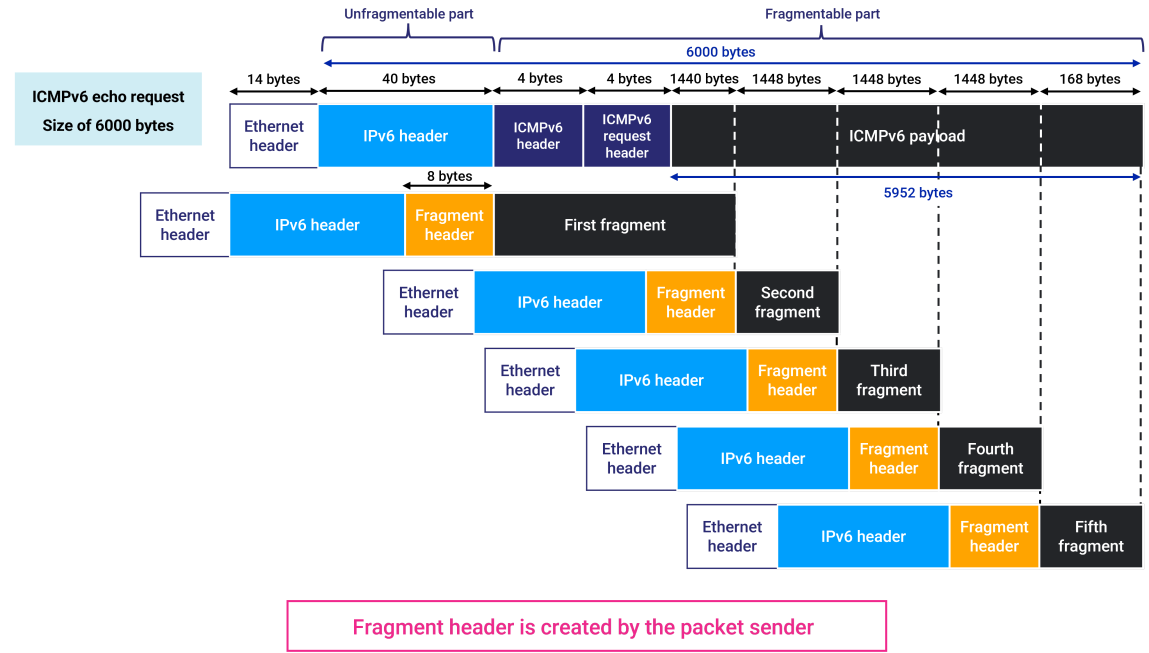
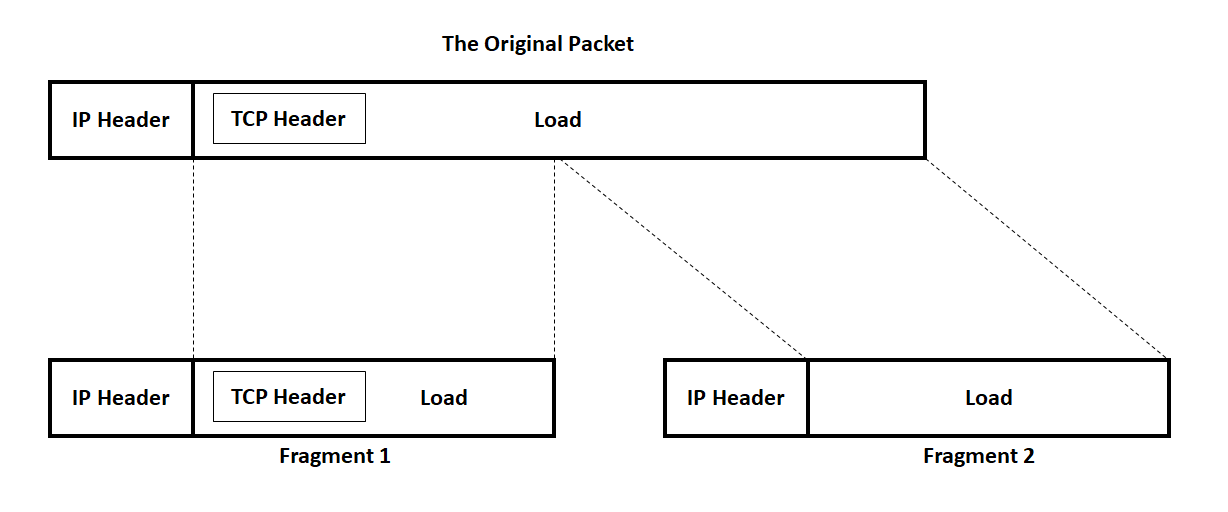
When a packet is too large: - It may be fragmented (split) or - It may be dropped if fragmentation is not allowed
Modern networks try to discover the best MTU along the path (PMTUD). If PMTUD fails (due to blocked messages or misconfigurations), you can get “black hole” behavior.
Symptoms Users Recognize
- Some sites load, others stall at a specific point
- Large downloads hang
- HTTPS sites sometimes fail mid-handshake
- VPN works for some apps but breaks others
These symptoms can look random, which is why MTU is often missed.
Why VPNs and Tunnels Trigger MTU Issues
VPNs add overhead. To fit the extra headers, the effective MTU must be smaller. If your device still sends large packets and PMTUD fails, you get drops.
What You Can Try Safely (User-Level)
Start with safe, reversible steps: 1. Restart router and VPN client. 2. If the issue happens only on VPN, disable VPN to confirm. 3. Try another network (mobile) to see if it’s path-specific.
For advanced users (only if you’re comfortable): - Some VPN apps expose an “MTU” or “MSS” setting. Lowering it modestly can help.
Avoid random MTU changes on enterprise networks unless you understand the policy.
Practical Implications in Real Systems
MTU issues are path-related. IPVerdict can still help you compare: - which public IP/ASN you exit from on different networks - whether a VPN exit is changing the path to a problematic destination
This supports the troubleshooting workflow: “Does changing exit network fix the symptom?”
Common Misunderstandings
Issue: Only certain sites fail on VPN - Try lowering VPN MTU/MSS slightly. - Try a different VPN server (different routing).
Issue: Only certain sites fail on home internet - Test on mobile to confirm. - Ask ISP support if there are known PMTUD issues.
Issue: Downloads stall at a fixed size - Often consistent with path MTU problems.
Q1: Is MTU only a “VPN problem”? No, but VPNs make it more likely.
Q2: Why do only some websites break? Different paths and packet sizes; some traffic triggers the MTU failure.
Q3: Can I permanently “fix” MTU without understanding it? You can break other traffic. Prefer minimal, documented adjustments.
Q4: What is MSS? MSS (Maximum Segment Size) is related to TCP payload sizing and is often used to avoid MTU issues.
Q5: Does IPv6 change MTU behavior? IPv6 handles fragmentation differently; PMTUD is still important.
Limitations
- Similar symptoms can come from DNS, firewall filtering, or server-side issues.
- Some apps handle fragmentation better than others.
Disclaimer
The information in this guide is provided for educational and diagnostic use. Network behavior can vary by environment, configuration, and data sources, so results should be treated as informative signals rather than definitive proof.
Conclusion
Understanding these fundamentals helps you interpret network signals more confidently and troubleshoot issues with fewer false assumptions.