Tor / Proxy Flags Explained
Why Tor/Proxy Detection Matters
In today’s Internet, users can hide their real IP addresses by routing traffic through anonymization networks like Tor or through proxy servers. This has legitimate benefits, such as protecting privacy or bypassing censorship, but it can also facilitate malicious activities by masking a user’s identity. Online services therefore pay close attention to whether an IP address is coming through Tor or a proxy, often flagging such IPs in security tools. These Tor/proxy flags serve as warning signals: a proxy connection might indicate someone is trying to spoof their location or identity (for good or bad reasons). In short, detecting Tor and proxy usage helps websites and networks assess risk and prevent abuse (for example, fraud, spam, or attacks). By understanding why an IP is flagged, we can better balance security measures with user privacy and avoid mislabeling benign users as threats.
What Is a Proxy Server?
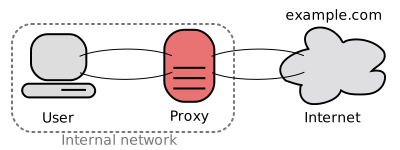
A proxy server is essentially an intermediary that relays your internet traffic. Instead of contacting a website directly, your computer sends the request to the proxy, which then forwards it to the destination server and back. This means the destination sees the proxy’s IP address, not yours. In simple terms, a proxy acts on behalf of the client, potentially masking the true origin of your requests. People use proxies for various reasons: to bypass geo-blocks or workplace filters, to cache and speed up web requests, or to stay anonymous on the web. Common types include open proxies (publicly accessible forward proxies), web proxies, and corporate proxies. A related concept is VPNs (Virtual Private Networks), which also tunnel your traffic through an intermediary server -- though technically a VPN encrypts all your device’s traffic, whereas a proxy might target specific browser or app traffic. In context of IP flags, VPNs often get lumped together with proxies since they similarly hide the original IP. The key point is that a proxy or VPN connection makes your traffic appear to come from the proxy server’s IP, not your actual device.
What Is Tor?
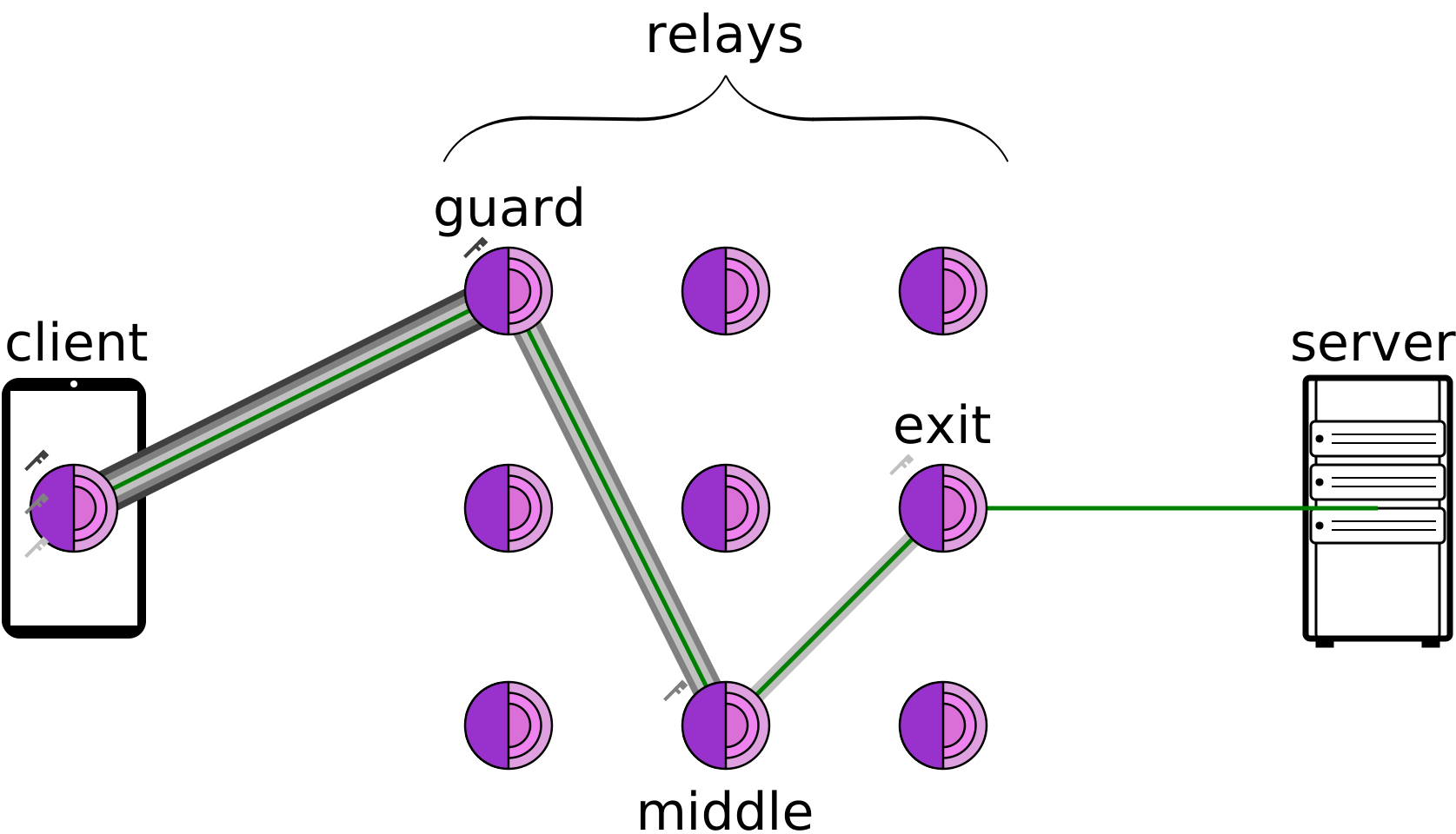
Tor, short for The Onion Router, is a special kind of anonymization network. It’s a free, volunteer-run overlay network designed for anonymous communication. Tor routes your internet traffic through multiple relays (nodes) -- typically three: an entry guard, a middle relay, and an exit node -- with layers of encryption (like an onion) at each hop. By the time your traffic emerges from the final relay (the exit node) to contact the target website, it’s nearly impossible to trace it back to you. The website only sees the IP address of that Tor exit node, not your real IP. This provides strong privacy and is used by journalists, activists, and everyday people who want to avoid tracking. However, Tor is also used by malicious actors to conceal their origin. Notably, Tor exit nodes are public -- the Tor Project publishes a list of all active exit relay IPs. This makes it straightforward for websites and IP lookup tools to flag traffic coming from a Tor exit IP. In other words, if an IP address is known to belong to a Tor exit relay, a security tool might label it “Tor” to warn that the traffic is anonymized. It’s important to remember Tor itself is not illegal or malicious -- it’s a tool that can be used for privacy or abuse alike.
What Does a Proxy/Tor Flag Mean on an IP?
When you see a tool or service label an IP address as “Proxy” or “Tor,” it means that IP has been identified as belonging to a proxy server or Tor exit node. For example, an IP flagged as a Tor exit node is one that Tor users’ traffic comes out of (the last hop in the Tor network). A proxy flag might indicate the IP is a known open proxy, a VPN endpoint, or otherwise associated with proxy services. These flags are essentially labels based on IP reputation and characteristics. They come from data that the service has gathered or subscribed to: for instance, a database of known proxy IPs or the official Tor exit list. In practice, a flag doesn’t reveal who the user is; it only signals how their connection is being made. Think of it as a tag like “this IP is suspicious because it’s a public proxy” or “this IP is part of the Tor network.” Sites use these tags as risk indicators -- an IP with a proxy/Tor flag might trigger additional verification steps, get limited access, or in some cases be blocked from certain actions. The purpose is to spot potentially masked connections quickly. However, a flag is not proof of malicious intent on its own -- it’s one piece of the puzzle.
How Are Proxy and Tor IPs Detected?
Detecting whether an IP is a proxy or Tor node involves a mix of methods, from simple lookups to clever network tricks. Here are the basic ways such flags are determined:
- Public Lists and Databases: The simplest method is checking against known lists. Tor’s public directory lists all exit node IPs, so any IP from that list can be flagged as “Tor exit.” Similarly, there are many public and commercial proxy IP databases that catalogue known VPN servers, open proxies, and datacenter IP ranges. Services update these lists continuously, and an IP lookup tool can simply say “Yes, this IP appears in the known proxy list.”
- Reverse DNS and Host Clues: Many detection systems do a reverse DNS lookup on the IP address. The rDNS can reveal the domain or hostname associated with the IP. If the hostname contains clues (like vpn.provider.com or a cloud data center domain), that hints the IP might be a proxy or VPN server. Likewise, the IP’s ASN or ISP info may show it’s owned by a hosting company rather than a residential ISP, which often correlates with VPNs/proxies.
- Geolocation and Behavior Mismatch: Some detections rely on comparing the IP’s apparent geolocation to the user’s claimed location or behavior. If an IP’s geo-IP data says “Germany” but the user claims to be in Canada, that discrepancy might raise a flag for proxy usage. Similarly, if a single IP is seen making requests that span many different user accounts or regions in a short time, it might indicate a proxy (since multiple people could be funneling through one exit point).
- Latency and Network Fingerprinting: Proxies and Tor introduce extra hops, which often adds latency. Some tools measure ping or connection delay to the client IP -- if it’s unusually high given the distance, it suggests traffic may be detouring through a proxy server. A traceroute can sometimes even show intermediate hops that indicate proxy routing. Additionally, certain protocols or handshakes have fingerprints: for example, VPNs using OpenVPN or IPSec might have telltale patterns that deep packet inspection can catch.
- HTTP Headers and Leaks: When using a proxy, sometimes extra headers like X-Forwarded-For or Via appear in your web requests, revealing the original IP or the presence of a proxy. Sophisticated anonymity tools usually strip these, but misconfigured proxies might leak them. Websites also employ tricks like WebRTC leaks -- WebRTC is a browser feature that can inadvertently reveal your real IP address even if you’re on a proxy/VPN. By running a small script in your browser, a site can check if your browser’s WebRTC reports a different IP than the one your HTTP request came from. If yes, they’ve caught a proxy/VPN user via this leak test. Similarly, DNS leak tests can see if your DNS queries go to an unexpected server, indicating a proxy/VPN in use.
- Traffic Fingerprinting: Advanced detection systems may analyze usage patterns. For example, proxy or bot traffic might hit a website in rapid bursts or with identical behavior across sessions, unlike a typical single human user. If one IP address is loading hundreds of pages or performing actions much faster than a human could, a service might conclude it’s a bot using a proxy. Captcha challenges are also used -- a genuine user on Tor can solve a captcha, whereas an automated botnet behind a proxy might fail, thus revealing suspicious proxy use. Machine learning models even crunch large datasets of network traffic to spot subtle patterns that correlate with known proxy usage.
In practice, IP flagging combines multiple data sources. Imagine a flow diagram: when an IP connects, the system checks it against the Tor exit list and known proxy IP databases first. Next, it might do a reverse DNS lookup and compare geolocation data. It could then measure connection latency or run a WebRTC leak test via the user’s browser. Each step feeds into a decision: if any check returns a positive (for example, “IP found in Tor list” or “WebRTC revealed a different IP”), the IP gets tagged with the appropriate flag (Tor or proxy). This multi-step process (often automated) is how an IP address ends up flagged in security tools.
Legitimate vs. Malicious Uses of Tor/Proxies
Not everyone using a proxy or Tor is a bad actor. There are plenty of legitimate uses, which is why a flag alone shouldn’t condemn a user. On the legitimate side, we have:
- Privacy and Security: Ordinary users, journalists, or activists may use Tor to protect their identity and avoid surveillance. Likewise, privacy-conscious individuals use VPNs/proxies to encrypt their traffic on public Wi-Fi or to prevent websites from tracking their location.
- Bypassing Censorship or Geo-Blocks: Many people rely on proxies or Tor to access information that’s blocked in their country. These are generally benign reasons -- the person is using the tool as intended, not to commit fraud.
- Business and Research: Web developers, SEO specialists, and researchers often use proxies to test how websites appear from different locations or to scrape public data without revealing their office IP. Even some security testers use Tor to probe their own systems from an external perspective.
On the other hand, malicious actors leverage Tor/proxies frequently:
- Spam and Bots: Spammers and bot operators use open proxies or Tor to automate actions while hiding their IP. If one proxy gets blocked, they switch to another, which makes it harder to trace or block them individually.
- Fraud and Cybercrime: An online fraudster might use a proxy in the same country as a stolen card’s billing address to avoid suspicion. Tor is also used to launch attacks or conduct illicit trades on the dark web.
- Evasion of Rate Limits/Bans: If someone is banned on a platform, they’ll often return via a proxy with a new identity. Bots that scrape content or perform denial-of-service attacks use large proxy networks to distribute their traffic and evade simple IP-based blocks.
In summary, there’s a cat-and-mouse dynamic: good users use these tools for privacy, while bad actors abuse them for anonymity. This duality is exactly why detection exists -- not to outlaw Tor/proxies, but to manage the risk when those tools are in play.
Limitations of Flags and the Danger of Overblocking
While Tor/proxy flags are useful signals, they come with limitations and should be handled with care. A flag only tells you that the connection is coming through an anonymization layer, not who the user is or what their intent is. It’s a coarse indicator. There are several important caveats:
- False Positives and Collateral Damage: If a service automatically blocks all proxy or Tor IPs, it will inevitably block innocent users. Blanket blocking Tor “just in case” can cut off legitimate users. Over-relying on the flag can lead to overblocking, where you shut out a segment of your users or audience unnecessarily.
- Evasion and New Proxies: Determined malicious actors can often find ways around known lists. New proxy servers pop up, attackers can use compromised “residential” computers as proxies, and some will use stolen credentials on legitimate ISP networks. Not all proxy usage will be detected -- and conversely, not all detected proxies are doing bad things.
- Context Matters: A Tor exit node IP might be fine in one context (for example, a reader browsing your blog), but high-risk in another (for example, someone initiating a bank transfer). That’s why these flags should feed into a broader risk assessment, not stand alone as a verdict. Many security systems use proxy/Tor status as one factor among many -- for example, adding points to a risk score or triggering step-up authentication instead of outright blocking.
Bottom line: treat proxy and Tor flags as risk signals, not definitive proof of malicious intent. They are useful for flagging anonymity, but they don’t tell you why the user is hiding their IP. The best approach is to use these flags carefully and in combination with other data. For example, consider combining IP flags with login history, behavior analysis, or device fingerprinting before deciding to block or trust a session. By doing so, you respect the fact that some users have valid reasons to use Tor/proxies, and you avoid a false sense of security. After all, blocking every proxy won’t stop all bad actors -- but it might stop some good users from reaching you. Use Tor/proxy flags as one piece of the puzzle in a balanced security strategy.