NAT and CGNAT: Why Many People Share the Same Public IP
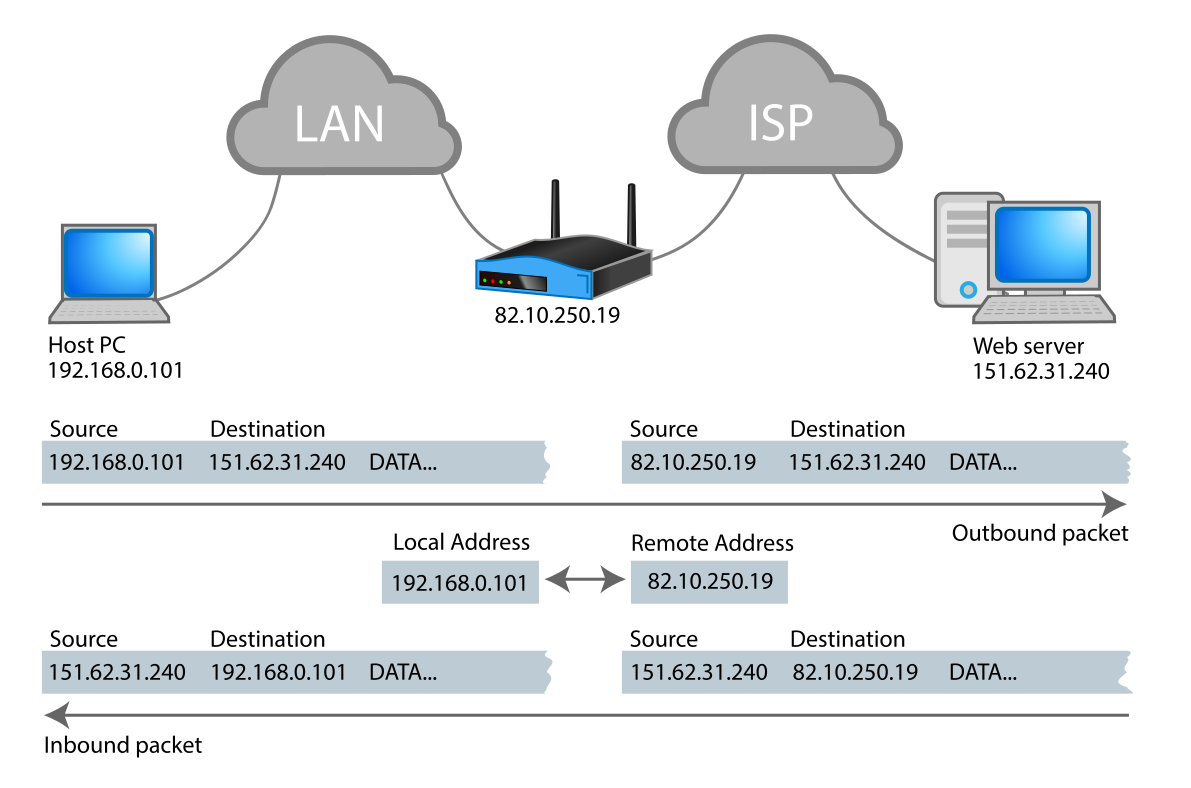
NAT lets many devices share one public IP by translating internal addresses.
Key Takeaways
- CGNAT is NAT done by the ISP, so many households can share one public IP.
- Sharing a public IP can cause rate limits, bans, or reputation issues that aren’t your fault.
- CGNAT can also break inbound connections (hosting, some games) unless you use workarounds.
NAT in Home Networks (The Simple Picture)
Most home networks have: - Private (local) addresses inside your Wi‑Fi (like 192.168.x.x) - One public IP on your router’s internet side
Your router uses NAT so your devices can reach the internet using that single public IP.
What Is Carrier-Grade NAT (CGNAT)?
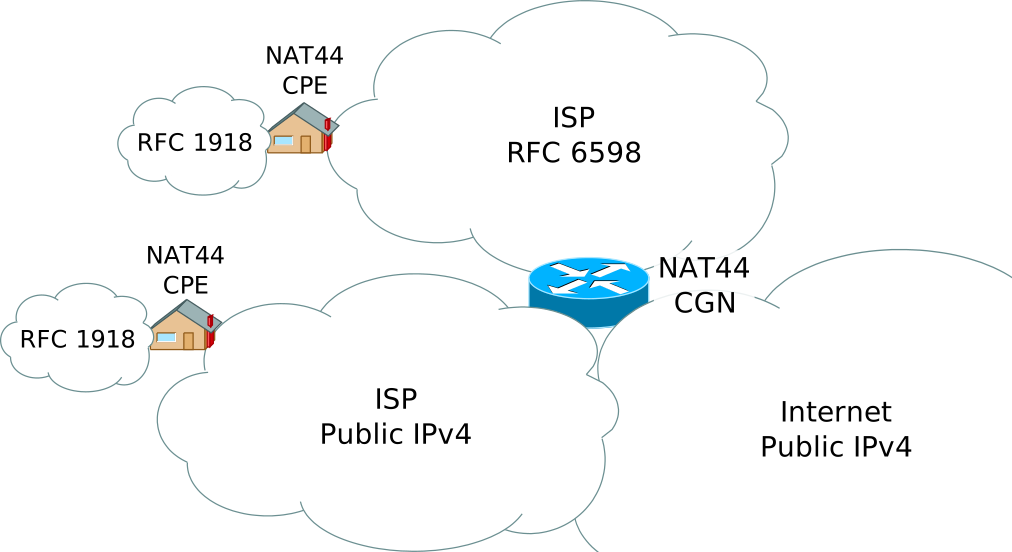
CGNAT pushes the same idea one step upstream: - Your router may have a private “WAN” IP from the ISP. - The ISP then translates many customers out through shared public IPs.
ISPs use CGNAT mainly because IPv4 addresses are limited.
Signs You’re Behind CGNAT
Common clues: - Your router’s “WAN IP” looks private (10.x, 172.16–31.x, 192.168.x) or other non-public ranges. - Port forwarding doesn’t work, even when configured correctly. - Your public IP changes frequently, or appears shared.
How CGNAT Affects Real Users
Website bans and rate limits If many users share one public IP, a service might: - Rate-limit that IP - Trigger extra verification (captcha) - Block the IP due to another user’s behavior
Gaming and hosting CGNAT often prevents inbound connections to your home network: - Hosting servers at home becomes difficult - Some peer-to-peer games or voice apps may have NAT traversal issues
Geolocation confusion If your ISP exits traffic from a central location, geolocation may appear in the wrong city/region.
Workarounds (What Users Can Do)
Options depend on your ISP and needs: - Use IPv6 if available (many services work better with direct addressing) - Request a public/static IPv4 (some ISPs offer it as an add-on) - Use a VPN with port forwarding if you need inbound access - Use a relay service (for hosting or remote access)
Practical Implications in Real Systems
Use IPVerdict to: - Confirm your current public IP - Identify your ISP/organization and ASN context - Compare what you see on different networks (Wi‑Fi vs mobile)
This helps answer questions like: - “Is my public IP stable?” - “Did my exit network change?”
Common Misunderstandings
Issue: Port forwarding doesn’t work - Verify whether you’re behind CGNAT (router WAN IP vs public IP). - If CGNAT: port forwarding on your router alone won’t be enough—ask ISP for a public IP or use a VPN/relay.
Issue: Websites block me “randomly” - Test from mobile data (different IP pool). - Restart your connection (may change shared public IP). - Avoid suspicious automation patterns; shared IPs are more sensitive.
Issue: IP location seems wrong - Check if your ISP exits traffic from a major city. - Compare results across networks.
Q1: Is CGNAT bad? It’s common and often fine for browsing/streaming. It becomes a problem mainly for inbound connections and reputation-sensitive services.
Q2: Can CGNAT cause IP bans that affect me? Yes—shared public IPs can inherit reputation issues.
Q3: Does using a VPN fix CGNAT? It can help for outbound identity changes; for inbound hosting you need a VPN plan that supports port forwarding (or a relay).
Q4: How do I know if I have a public IPv4? Compare your router WAN IP and your public IP; if WAN is private, you’re likely behind CGNAT.
Q5: Will IPv6 solve CGNAT? For many use cases, yes—IPv6 often provides direct addressing and avoids some NAT constraints.
Limitations
- Not all shared-IP behavior means CGNAT; some ISPs share via dynamic pools.
- IP changes can happen for normal maintenance.
Disclaimer
The information in this guide is provided for educational and diagnostic use. Network behavior can vary by environment, configuration, and data sources, so results should be treated as informative signals rather than definitive proof.
Conclusion
Understanding these fundamentals helps you interpret network signals more confidently and troubleshoot issues with fewer false assumptions.